Best Smart Wallets for Everyday Carry (2026 Guide)
Key Takeaways
- Smart wallets enhance everyday carry with features like quick card access, RFID protection, tracking, or MagSafe compatibility.
- Key types: Smart for EDC upgrades, Tracker for misplacing, RFID for security, MagSafe for iPhone phone+card carry.
- Zenlet 3 offers one-click, 8-card access with RFID. Chipolo CARD is a rechargeable tracker (Find My/Android Find Hub).
- ESR Geo Magnetic Wallet Stand provides MagSafe iPhone carry, Find My support, RFID blocking & 5-card storage.
- Ridge Wallet suits metal RFID front-pocket carry. Bellroy Apex Slim Sleeve offers premium slim leather RFID for 6-8 cards.
- Choose based on card capacity (3-8), access needs, material (metal/leather), and tracking (Apple Find My/Android Find Hub).
A smart wallet should make everyday carry easier, not just look more technical. The right wallet depends on what you actually need: faster card access, a slimmer pocket setup, RFID protection, wallet tracking, iPhone compatibility, or a cleaner way to carry cards and cash.
The best smart wallet for everyday carry is not always the wallet with the most features. A tracker card can help if you often misplace your wallet. A minimalist card-access wallet can be better if your main problem is bulk. A MagSafe wallet may fit iPhone users, while an RFID-focused wallet may suit people who want a simple card-protection upgrade.
This guide compares smart wallet types, verified product examples, and the key features to check before buying, so you can choose a wallet setup that fits your daily routine instead of buying based only on design or discount language.
What makes a wallet “smart”?
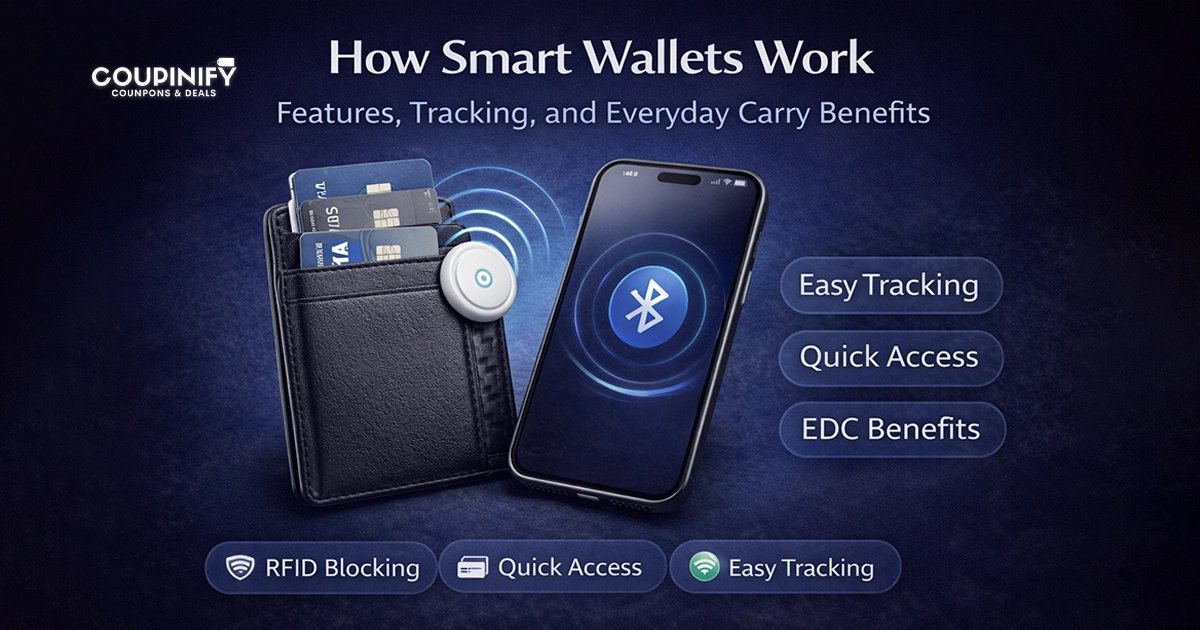
A smart wallet is not one single product type. In everyday shopping, the term can describe several wallet setups with extra convenience or protection features.
A wallet may be considered “smart” if it includes or supports:
- quick card access
- RFID protection
- tracker card compatibility
- built-in tracking
- MagSafe or phone attachment
- modular storage
- slim everyday carry design
- better card and cash organization
Some smart wallets focus on mechanical access, such as sliding cards out with one hand. Others focus on tracking, using Apple Find My or a brand-specific app. Some are simply slim RFID wallets designed to reduce pocket bulk while protecting cards.
The right choice depends on which problem you are trying to solve.
Smart wallet vs tracker wallet vs RFID wallet
These terms overlap, but they are not exactly the same.
| Wallet Type | What It Means | Best For |
|---|---|---|
| Smart wallet | A wallet with better card access, organization, RFID support, tracking support, or tech-friendly design | Everyday carry upgrades |
| Tracker wallet setup | A wallet with a built-in tracker or a tracker card added inside | People who often misplace wallets |
| RFID wallet | A wallet designed to help block unauthorized RFID scans | Transit, travel, crowded places |
| MagSafe wallet | A phone-attached wallet for compatible iPhones or MagSafe-style cases | iPhone users who want phone + card carry |
A smart wallet can also be an RFID wallet. A tracker wallet can also be slim. A MagSafe wallet may include tracking, but not every MagSafe wallet does. Before buying, it helps to compare the use case first, then the product.
Quick picks: best smart wallet types by use case
| Use Case | Best Wallet Type | Example To Compare | What To Check |
|---|---|---|---|
| Minimalist everyday carry | Slim card-access smart wallet | Zenlet 3 | Card access, RFID support, pocket comfort |
| Wallet tracking | Rechargeable tracker card setup | Chipolo CARD | Apple Find My or Android Find Hub, Qi charging, wallet space, battery routine |
| iPhone / MagSafe users | Magnetic phone wallet | ESR Geo Magnetic Wallet Stand | Find My support, MagSafe compatibility, 5-card holder storage, stand/grip use |
| RFID-focused metal carry | Minimalist RFID front-pocket wallet | Ridge Wallet | Rigid wallet feel, cash strap, card count, color/style variant |
| Premium slim leather carry | RFID leather wallet | Bellroy Apex Slim Sleeve | Magnetic closure, leather structure, 6–8 card capacity |
This table is not meant to say one wallet is best for everyone. It shows the main wallet types worth comparing depending on what problem you want to solve.
Zenlet 3 — Minimalist Card-Access Smart Wallet
Zenlet 3
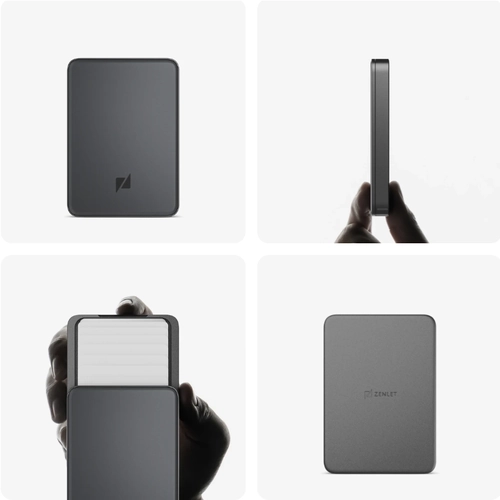
Highlights: Slim card-access wallet with one-click access, Tap & Go card support, RFID-shielded card storage, and modular panel options.
What to Know: Best suited for people who want a minimalist everyday wallet for quick card access, front-pocket carry, commuting, and cleaner card organization. Official Zenlet comparison lists Zenlet 3 with 8 total cards, 1 Tap & Go card, 7 RFID-shielded cards, and 11.5mm thickness.
Price: Check current price at the official Zenlet shop.
Zenlet 3 is a strong fit for people who want a slimmer everyday wallet built around fast card access and clean organization, rather than heavy tracking features. It uses a one-click fan-out design, so your cards spread out for easier selection instead of staying stacked inside a traditional bifold wallet.
According to Zenlet’s official product information, Zenlet 3 supports one contactless Tap & Go card while keeping the other cards under RFID protection. The official comparison lists Zenlet 3 with 8 total cards, including 1 Tap & Go card and 7 RFID-shielded cards, with an 11.5 mm thickness and 60 g weight.
This type of wallet works best if you want a compact card setup for commuting, front-pocket carry, and daily use. It is a better fit for minimalist everyday carry than larger Zenlet models designed for more storage, cash, or coin carry.
Best for:
- minimalist card carry
- people who want faster card access
- front-pocket carry
- daily commuting
- shoppers comparing slim RFID smart wallets
What to check before buying:
- whether 8-card capacity fits your daily carry
- whether 1 Tap & Go card is enough for your transit or payment setup
- whether you need coin, key, or larger cash storage
- whether you prefer a hard-shell card-access wallet over a soft leather bifold
- current price, color options, and availability
Skip it if:
- you mainly want built-in wallet tracking
- you carry many receipts, coins, keys, or cash
- you prefer a traditional soft leather bifold
- you need more than one Tap & Go card ready at the same time
Chipolo CARD — Rechargeable Wallet Tracker Card
Chipolo CARD
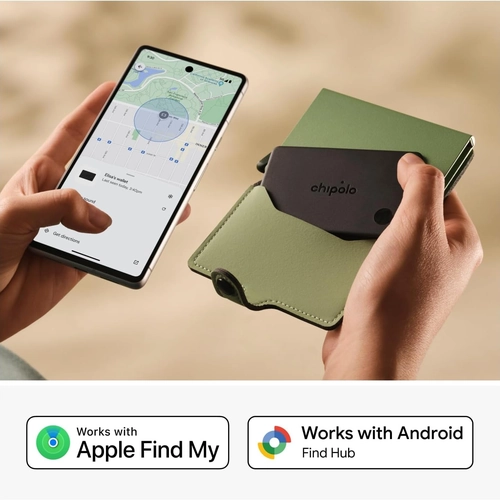
Highlights: Thin rechargeable wallet tracker card for people who want to add wallet tracking to an existing wallet, with Apple Find My or Android Find Hub support, Qi wireless charging, IP67 protection, and up to 1 year of battery life per charge.
What to Know: Best suited for people who often misplace their wallet but do not want to replace the wallet itself. Official Chipolo specs list up to 120 m / 400 ft Bluetooth range, around 110 dB loudness, 85.2 × 53.6 × 2.5 mm dimensions, and compatibility with one finding network at a time.
Price: $74.00 on Amazon for Pack of 2. Check current price before buying.
Chipolo CARD is not a wallet by itself. It is a thin tracker card you place inside an existing wallet when wallet tracking matters more than changing the wallet design.
According to Chipolo’s official product information, Chipolo CARD works with either Apple Find My on iPhone or Find Hub on Android, with one finding network active at a time. Chipolo also lists up to 120 m / 400 ft Bluetooth range, around 110 dB loudness, IP67 water and dust resistance, and a rechargeable Qi wireless battery that lasts up to 1 year per charge.
This makes Chipolo CARD a good fit for people who already like their current wallet but often leave it in a bag, car, office, hotel room, or another room at home. It is especially useful for commuters, travelers, students, and anyone who wants a wallet tracking setup without switching to a new wallet.
Best for:
- wallet tracking
- people who often misplace their wallet
- adding tracking to an existing wallet
- iPhone or Android users who want a tracker-card setup
- travelers, commuters, and students
What to check before buying:
- whether you want to use Apple Find My or Find Hub on Android
- whether your wallet has room for one extra card
- whether Qi wireless charging fits your routine
- whether one-year rechargeable battery life is enough for you
- current price and availability
Skip it if:
- you want a full smart wallet instead of a separate tracker card
- your wallet is already too full to fit another card
- you want to use Apple Find My and Android Find Hub at the same time
- you do not want another rechargeable item to manage
ESR Geo Magnetic Wallet Stand — Magnetic Wallet With Find My
ESR Geo Magnetic Wallet Stand — MagSafe Wallet With Find My Support
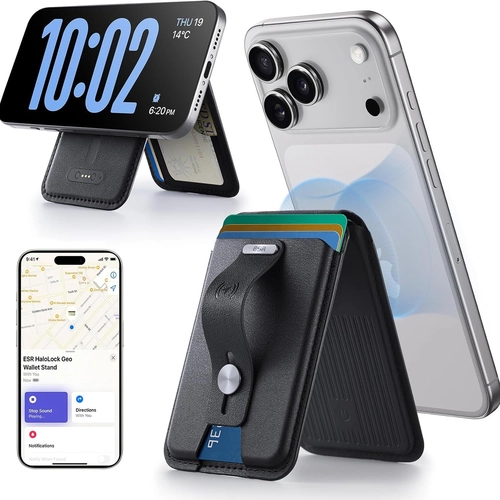
Highlights: Magnetic phone wallet with full Find My functionality, RFID blocking, 5-card holder storage, and an adjustable stand/grip design for MagSafe-style iPhone carry.
What to Know: Best suited for iPhone users who want phone-attached card carry instead of a separate pocket wallet. This Amazon listing positions it as a MagSafe wallet with Find My support, RFID blocking, 5-card storage, and stand/grip functionality for compatible iPhone models.
Price: Listed at $38.69 on Amazon at the time of checking. Current price may vary.
ESR Geo Magnetic Wallet Stand is a magnetic phone wallet, not a traditional pocket wallet. It fits the smart wallet discussion because it combines card carry, MagSafe-style attachment, RFID blocking, grip/stand functionality, and Find My support in one phone accessory.
According to ESR’s official product information, the wallet includes a fold-flat finger loop for grip and stand use, RFID blocking, smart card storage, and a built-in Find My module for tracking the wallet’s location. ESR also states that the wallet fully recharges in 1.5 hours, lasts up to 6 months per charge, and supports up to 500 charging cycles.
This makes it a good fit for iPhone users who carry only a few cards and prefer a phone-attached setup instead of a separate wallet. It is less suitable if you carry many cards, cash, receipts, or prefer keeping your wallet separate from your phone.
Best for:
- iPhone users
- MagSafe-style carry
- people who carry only a few cards
- phone-attached wallet setups
- users who want Find My support in a magnetic wallet
What to check before buying:
- whether your phone and case support MagSafe-style accessories
- whether the card capacity fits your daily carry
- whether you want a phone-attached wallet instead of a separate wallet
- whether you will use the grip and stand features
- current price, color options, and availability
Skip it if:
- you carry many cards or cash
- you prefer a separate pocket wallet
- you do not want to recharge a wallet accessory
- your phone or case does not work well with magnetic wallet attachments
Ridge Wallet — best for metal RFID carry
Ridge Wallet — Minimalist RFID Front-Pocket Wallet
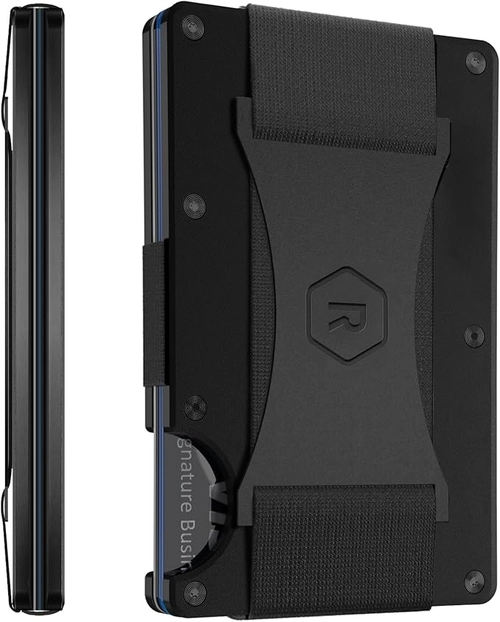
Highlights: Slim RFID-protected front-pocket wallet with a structured metal cardholder design, integrated cash strap, and compact carry for cards and folded bills.
What to Know: Best suited for people who want a durable minimalist wallet instead of a traditional bifold. This Amazon listing shows the Ridge Wallet in Matte Black (Titanium), Style: Hex Ridge, with RFID protection and an integrated cash strap for compact front-pocket carry.
Price: Listed at $99.00 on Amazon at the time of checking for the Matte Black (Titanium) / Hex Ridge variant. Current price may vary by color and style.
Ridge Wallet is a good fit for people who want a structured front-pocket wallet instead of a traditional leather bifold. It is not a tracker wallet, but it belongs in this smart wallet guide because it focuses on slim everyday carry, RFID protection, card organization, and a more durable metal-style wallet setup.
This Matte Black (Titanium) / Hex Ridge variant works best if you want a compact wallet for cards and folded bills, with an integrated cash strap instead of a full cash pocket. It is a better match for minimalist carry than for people who need space for coins, receipts, many bills, or loose items.
Best for:
- metal RFID wallet carry
- front-pocket everyday carry
- people who want a structured minimalist wallet
- card-focused carry with folded bills
- shoppers who prefer a durable wallet over a soft bifold
What to check before buying:
- whether you like a rigid metal-style wallet
- whether the cash strap fits how you carry bills
- whether the selected Amazon variant, color, and style match what you want
- whether the wallet fits your real daily card count
- current price, availability, and color/style options
Skip it if:
- you prefer soft leather bifold wallets
- you carry coins, receipts, or many loose items
- you want built-in wallet tracking
- you want a wallet with quick fan-out card access
- you dislike rigid wallets in your pocket
Bellroy Apex Slim Sleeve — best for premium slim leather carry
Bellroy Apex Slim Sleeve — Premium Slim RFID Leather Wallet
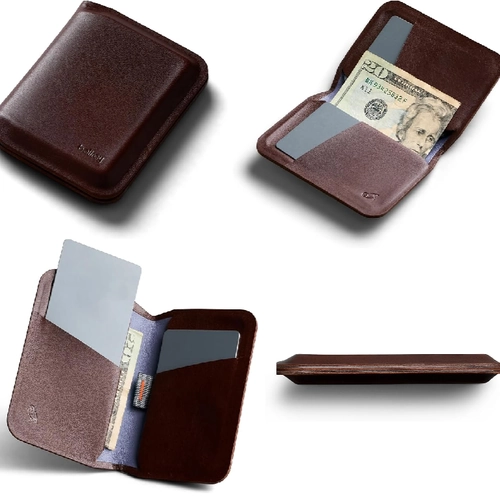
Highlights: Premium slim leather wallet with RFID protection, magnetic closure, pull-tab card access, and storage for 6–8 cards once broken in.
What to Know: Best suited for people who want a premium leather wallet that still stays slim and practical for everyday carry. This Amazon listing shows the Bellroy Apex Slim Sleeve in Espresso, with RFID protection, magnetic closure, easy-access card storage, and a slim bifold design.
Price: Listed at $135.00 on Amazon at the time of checking for the Espresso variant. Current price may vary by color and availability.
Bellroy Apex Slim Sleeve is a good fit for people who want a premium leather wallet that still feels slim, structured, and practical for everyday carry. It is not a tracker wallet, but it belongs in this guide because it combines RFID protection, compact card storage, magnetic closure, and a more refined leather carry style.
This wallet works best if you prefer a traditional wallet feel but do not want a bulky bifold. The Apex Slim Sleeve is designed for 6–8 cards once broken in, with folded bill storage and a pull-tab card access system. It is a stronger match for premium slim carry than for people who need coin storage, large cash space, or built-in wallet tracking.
Best for:
- premium slim leather carry
- people who prefer leather over metal wallets
- RFID-protected everyday carry
- carrying 6–8 cards with folded bills
- shoppers who want a refined bifold-style wallet without too much bulk
What to check before buying:
- whether 6–8 card capacity fits your daily carry
- whether you like magnetic closure
- whether you need folded bill storage
- whether the Espresso variant is the color you want
- current price, color options, and availability on Amazon
Skip it if:
- you want built-in wallet tracking
- you prefer hard-shell metal wallets
- you carry coins, receipts, or many loose items
- you need more than 8 cards
- you want the thinnest possible front-pocket cardholder
How to choose a smart wallet for everyday carry
After comparing examples, choose based on your main carry problem.
If your current wallet is too bulky, start with a slim card-access wallet or minimalist RFID wallet. If you often misplace your wallet, start with a tracker card or a wallet with built-in tracking support. If you want phone-attached carry, compare MagSafe-style wallets. If you want a traditional wallet feel with better protection, compare slim RFID leather wallets.
The best smart wallet is the one that fits your routine, not the one with the longest feature list.
Card capacity and pocket comfort
Card capacity matters because a wallet that looks slim online can feel bulky once you load it.
As a simple rule:
| Carry Style | Practical Fit |
|---|---|
| 3–5 cards | Minimalist carry |
| 5–8 cards | Everyday carry for many users |
| 8+ cards | Check thickness and access method carefully |
Zenlet-style card-access wallets are better for people who want a cleaner card setup. Tracker cards like Chipolo CARD add one more card-sized item, so you need to make sure your wallet has room. Ridge-style wallets can support a wider card range, while Bellroy’s Apex Slim Sleeve sits in a more premium slim-leather lane.
Quick card access and daily usability
A smart wallet should make the cards you use most often easier to reach. This matters more than many buyers expect.
Before choosing a wallet, ask:
- Can you access your main card quickly?
- Do you need one-hand access?
- Do you carry transit or access cards?
- Do you need folded bills?
- Do you carry coins?
- Will the wallet still feel comfortable after adding your real daily load?
Zenlet is a good example of a wallet where the value is built around card access and compact organization. Ridge is more of a structured cardholder. Bellroy is closer to a premium slim leather wallet. A tracker card setup is different again because tracking adds functionality but also uses wallet space.
Tracking and anti-loss features
Tracking is useful if losing your wallet is a real problem for you. But it should not be treated as a default requirement for everyone.
A tracker card setup works best if:
- you often misplace your wallet
- you move between bags often
- you commute or travel frequently
- you already use Apple Find My
- your wallet has room for a card-style tracker
Chipolo CARD is an example of a rechargeable tracker-card setup for people who want wallet tracking without replacing the wallet itself. It can work with Apple Find My or Android Find Hub, with one finding network active at a time, and it adds one thin card-sized item to your wallet.
Tracking may not be worth it if you rarely lose your wallet, do not want another battery-powered item, or use a phone ecosystem that does not match the tracker.
RFID protection: useful, but not the whole reason to buy
RFID protection can be useful, especially if you want a wallet designed around card security. But it should not be the only reason to choose a smart wallet.
A good wallet still needs to feel comfortable, hold the right number of cards, and fit your daily routine. If RFID is the only feature listed and the product page does not explain card capacity, dimensions, materials, or access method, compare other options.
Zenlet, Ridge, ESR, and Bellroy all have product information that includes RFID-related protection, but they solve different problems: card access, metal minimalist carry, phone-attached carry, and premium slim leather carry.
Materials, durability, and everyday carry style
Material affects how a smart wallet feels in real life.
Metal wallets can feel durable and structured, but some people find them too rigid. Leather wallets feel more traditional and premium, but they may need more care. Magnetic phone wallets are convenient, but they depend on phone and case compatibility. Card-access wallets can feel efficient, but you need to like the access mechanism.
Before buying, compare:
- metal vs leather vs synthetic materials
- card access mechanism
- scratch resistance
- closure type
- pocket comfort
- cash storage
- long-term durability
- whether the style fits work, travel, or daily carry
Battery, charging, and app compatibility
Not every smart wallet has a battery. Minimalist RFID wallets usually do not need one. Tracker cards and Find My wallets do.
Before choosing a tracking wallet or tracker card, check:
- Does it work with Apple Find My?
- Does it work with Android?
- Is the battery rechargeable or replaceable?
- How long does the battery last?
- Does it need a proprietary charging cable?
- Does the product page clearly explain setup?
Chipolo CARD uses Apple Find My or Android Find Hub, with one finding network active at a time, and uses a rechargeable Qi wireless battery. ESR Geo Magnetic Wallet Stand includes Find My support in a phone-attached wallet setup, so it is better for people who want tracking inside a MagSafe-style wallet rather than a separate tracker card.
Who should buy a smart wallet?
A smart wallet makes sense if you want a more intentional everyday carry setup.
Buy one if:
- your current wallet is too bulky
- you want faster access to your most-used cards
- you prefer front-pocket carry
- you often misplace your wallet
- you want RFID support
- you want a phone-attached wallet setup
- you want a cleaner card-and-cash system
If you are not sure which type to choose, start with the problem first. For card access, compare Zenlet-style wallets. For tracking, compare Chipolo CARD-style tracker cards. For RFID metal carry, compare Ridge-style wallets. For premium leather carry, compare Bellroy-style wallets.
Who should skip a smart wallet?
A smart wallet is not always the right upgrade.
Skip or be cautious if:
- you carry many receipts, coins, or paper items
- you prefer traditional soft bifold wallets
- you do not want battery-based tracking
- you do not want app setup
- you dislike hard-shell wallets
- you need large cash storage
- you often switch phone ecosystems
A wallet should reduce friction. If it adds charging, app setup, cable management, or pocket discomfort you do not want, a simpler slim wallet may be a better choice.
What to avoid when choosing a smart wallet
Be careful with:
- unclear card capacity
- vague RFID claims
- tracker features without ecosystem details
- thick wallets marketed as slim
- MagSafe wallets without compatibility details
- product pages that do not explain battery life
- wallets that need uncommon charging cables
- hard-shell wallets if you prefer soft pocket carry
- buying only because a product looks futuristic
A smart wallet should make daily carry easier. If the product page does not clearly explain what the wallet does, how many cards it carries, or what devices it works with, compare other options.
Where to check smart wallet deals
After you know what wallet type fits your everyday carry, it becomes easier to compare offers without buying based only on design, discount language, or “smart” branding.
For broader browsing, start with Coupinify’s Electronics & Technology category, then narrow into Smart Accessories and Smart Wallets when comparing card-access wallets, tracker setups, RFID wallets, and everyday carry accessories.
For shoppers comparing minimalist card-access wallets, you can check the Zenlet coupons and deals before buying.
The better approach is to choose the wallet type first, then check available deals. That helps you avoid buying a wallet that looks discounted but does not match your card capacity, pocket comfort, tracking needs, or phone ecosystem.
Final buying advice
The best smart wallet for everyday carry in 2026 is the one that solves your main carry problem.
Choose a minimalist card-access wallet if you want faster card access and a slimmer daily setup. Choose a tracker card setup if losing your wallet is the main issue. Choose an RFID wallet if card protection and simple carry matter most. Choose a MagSafe wallet if you want phone-attached card carry and your phone setup supports it.
Do not choose a smart wallet only because it has the most features. Choose the one you will actually carry every day.
FAQ
What is a smart wallet?
A smart wallet is a wallet with extra convenience, organization, protection, or tracking features. It may include quick card access, RFID protection, tracker support, built-in tracking, MagSafe compatibility, or a slimmer everyday carry design.
Are smart wallets worth it?
Smart wallets are worth it if they solve a real carry problem for you. They are useful if your current wallet is bulky, hard to organize, easy to lose, or missing features like RFID protection or tracking support.
Do smart wallets need charging?
Some smart wallets or tracker cards need charging, but not all of them. RFID wallets and minimalist card-access wallets usually do not need batteries. Tracker cards and Find My wallets may use rechargeable or long-life batteries.
What is the difference between a smart wallet and a tracker card?
A smart wallet is the wallet itself. A tracker card is a separate card-shaped device that can be placed inside a wallet to help locate it. Some wallets include tracking features, while others need a separate tracker card.
Is RFID protection necessary in a wallet?
RFID protection can be useful, but it should not be the only reason to buy a wallet. Card capacity, access, comfort, material, and daily usability usually matter just as much.
What is the best smart wallet for everyday carry?
The best smart wallet depends on your use case. A minimalist card-access wallet is good for slim daily carry. A tracker card setup is better if you often lose your wallet. A MagSafe wallet works for compatible phone setups. An RFID wallet is better if you want simple card protection and everyday organization.