College Backpack Essentials: What to Carry, Leave, and Skip
Key Takeaways
- A practical college backpack should match the day's classes, commute, device needs, and activities, not an entire semester's items.
- Start with a base kit: ID, keys, phone, payment method, required class materials, and one note-taking method.
- Use a 'Student Daily Load System' for packing: audit daily needs, build a base kit, add conditional modules, and decide what to carry.
- Conditional modules include Device, Charging, Meal, Weather, Activity, Commute, and Personal, added only when the day requires them.
- Avoid overpacking items like materials for other days, duplicate chargers, bulk stationery, full-size personal care products, and old receipts.
- Perform a five-minute evening reset to remove clutter, return unused items, recharge devices, and pack only for the next day's schedule.
A college backpack can become unnecessarily heavy long before a student notices the problem. A textbook from yesterday, three charging cables, loose receipts, unused stationery, and several “just in case” items may stay in the bag for weeks even though they are not needed for today’s classes.
A more practical approach is to pack around the day’s schedule rather than copy one master list of college essentials. The classes you are attending, the time you will spend on campus, your commute, access to a dorm or car, and any activities after class should determine what goes into the backpack.
This article uses a simple Student Daily Load System: complete a quick daily audit, start with a small base kit, add only the modules the day requires, and decide what to carry, leave behind, or skip. The result should be a backpack that supports the day without becoming storage for everything you might need during the semester.
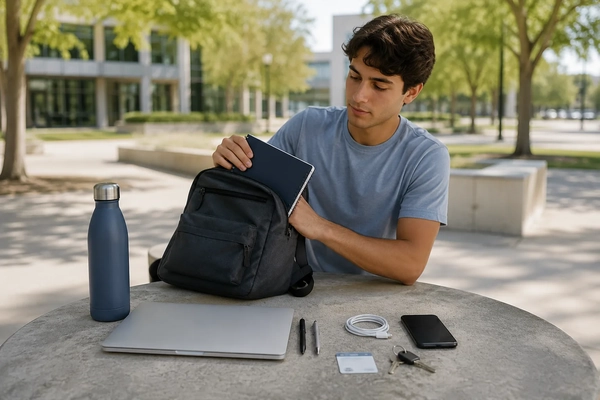
Quick answer: A practical college backpack should match the classes, commute, device needs, and activities on that specific day. Most students need their ID, keys, phone, payment method, required class materials, and one reliable way to take notes. A laptop, charger, food, weather layer, activity gear, or item tracker should be added only when the day’s schedule makes it useful. Items that duplicate another tool, belong in the dorm, or have not been used for several days can usually stay behind.
What Should Be in a College Backpack?
The contents of a college backpack should solve the needs of one campus day. There is no single list that works equally well for a student living five minutes from class, a commuter spending eight hours away from home, and someone moving directly from lectures to a work shift.
Begin with the items required for access and coursework. These commonly include a student ID, keys, a phone, a payment method, the materials required for that day’s classes, and a way to take notes. Everything else should earn its place based on the schedule.
A laptop may be essential for a programming lab but unnecessary for a discussion class where a notebook is enough. A power bank may be useful during a long commute but redundant when a student has a short day and reliable access to outlets. A lunch, weather layer, gym kit, or small personal-care pouch may also make sense on some days and remain at home on others.
Pack for the day you have, not every situation that might happen during the semester.
The simplest way to make that decision is to separate backpack contents into three groups:
- Carry today: needed for the current schedule.
- Leave at the dorm or at home: useful, but not needed during the day.
- Usually skip: duplicated, rarely used, or unrelated to a specific need.
Start With a Five-Factor Daily Load Audit
Before packing, spend one or two minutes reviewing the day. This prevents the backpack from becoming a permanent storage space and makes it easier to identify what is actually necessary.
1. Which classes are on the schedule?
Check the materials required for each class rather than carrying supplies for the entire week. Consider whether the class needs a laptop, tablet, textbook, workbook, lab material, printed assignment, calculator, notebook, or only basic writing tools.
2. How long will you be away from your dorm or home?
A two-class morning creates a different packing need from a full day that includes lectures, study time, meals, and evening activities. Longer days may justify additional food, charging, weather, or personal items. Shorter days usually do not.
3. Which devices are genuinely required?
Do not carry every device simply because it fits. Decide whether the day calls for a laptop, tablet, e-reader, calculator, headphones, or none of them. Each device may also create secondary needs such as cables, adapters, cases, or chargers.
4. What resources can you access during the day?
Consider whether you can return to a dorm, reach a parked car, use a locker, buy food, refill water, print documents, or charge a device on campus. An available resource may eliminate the need to carry a duplicate item.
5. What happens after class?
A gym session, lab, student club, work shift, practice, or appointment may require a separate module. Add that module deliberately rather than mixing unrelated items throughout the backpack.
A quick daily audit should answer one practical question: Will I realistically use this item before I return home or to my dorm? When the answer is unclear, it probably does not belong in the daily load.
Build a Base Kit, Then Add Only the Modules You Need
The Student Daily Load System begins with a small base kit. Conditional modules are then added according to the schedule. This approach is more flexible than maintaining one oversized checklist for every day.
The Base Kit
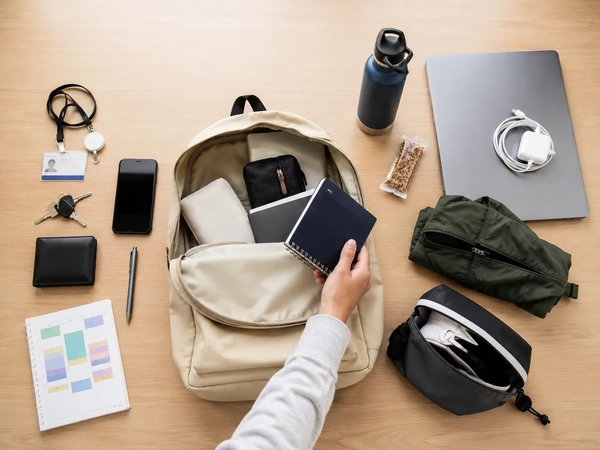
A base kit contains the items that support access, communication, payment, and required coursework:
- Student ID or campus access card.
- Keys.
- Phone.
- A payment method actually used during the day.
- Required class materials.
- One note-taking method.
The base kit is intentionally limited. A laptop is not automatically included because not every course or class session requires one. The same applies to textbooks, charging equipment, food, activity gear, and item trackers.
Conditional Modules
| Module | Add it when | Possible contents |
|---|---|---|
| Device Module | A class or assignment requires a laptop, tablet, calculator, or another device | Required device, protective case, necessary accessory |
| Charging Module | The device may not last through the scheduled campus day | One compatible charger, required cable, optional power bank |
| Meal Module | You will be on campus through a meal period or have limited food access | Meal, snack, reusable utensils when needed |
| Weather Module | The forecast or outdoor route requires it | Compact umbrella, light layer, weather-specific accessory |
| Activity Module | You have a lab, gym session, club, practice, or work shift | Only the equipment required for that activity |
| Commute Module | You travel a longer distance or cannot return home between classes | Transit item, charging support, food, compact personal essentials |
| Personal Module | You have a specific recurring need during the day | A small, clearly defined set of personal items |
Modules keep the backpack adaptable. A student can add the Weather Module on a rainy day, remove the Charging Module on a short morning, and include the Activity Module only when there is a scheduled activity.
College Backpack Carry, Leave, or Skip Table
The following table provides a starting point. The correct choice may change from one day to another, so it should be treated as a decision tool rather than a universal rule.
| Carry today | Leave at dorm or home | Usually skip |
|---|---|---|
| Student ID and keys | Duplicate chargers | Cables that do not match the day’s devices |
| Materials required for today’s classes | Materials for classes on other days | The full set of textbooks for the week |
| Laptop or tablet when required | Devices not needed during the day | Backup gadgets without a defined use |
| One practical note-taking setup | Bulk stationery supplies | Multiple pens, notebooks, or pouches serving the same purpose |
| Water or food when the schedule requires it | Full-size food containers not suited to the day | Old wrappers, empty containers, and packaging |
| Weather or activity module when needed | Dorm-only personal supplies | Seasonal items unrelated to the current forecast |
| One compatible charging setup when necessary | Extra wall chargers kept for other locations | A collection of adapters carried without a use case |
The most important distinction is between “useful in general” and “needed today.” A second charger may be useful at a desk, but that does not mean it needs to travel in the backpack. A textbook may be essential for one course, but it can stay in the dorm on days when that course does not meet.
Pack Only the Class Materials the Day Requires
Course materials often account for much of the daily load. The easiest way to reduce unnecessary contents is to pack according to the actual class sequence.
Review each course before leaving:
- Does the class require a laptop or tablet?
- Is the reading available digitally?
- Will a notebook or binder be used?
- Is a printed assignment, workbook, or lab document required?
- Are specific writing tools or calculators needed?
A student with three classes may need three completely different setups. One course may require a laptop, another may use a printed workbook, and a third may need only a notebook. Carrying the full set of materials for every course creates weight and clutter without helping the day’s work.
Keep stationery proportional to actual use. A small number of reliable pens, a pencil when required, and one highlighting tool may be enough. Large collections of markers, sticky notes, notebooks, and backup supplies belong in a room or study area unless the day has a specific need for them.
Items that primarily support a permanent study space should remain there. For guidance on organizing lighting, stationery, devices, and storage around a fixed workspace, see the Back-to-School Student Desk Setup guide .
Keep ID, Keys, and Payment Essentials Easy to Reach
Student IDs, access cards, keys, and payment methods may be used several times throughout the day. They should have a consistent location that is easy to access without opening and searching through the entire main compartment.
Choose one secure pocket or small organizer and use it consistently. Avoid dropping keys loose beside notebooks, food containers, or cables. Loose objects are easier to overlook when moving between classrooms, libraries, dining areas, and transportation.
Reduce the number of cards and papers carried each day. A wallet does not need to hold every membership card, expired receipt, or document stored at home. Carry the payment methods and campus credentials that support the actual routine.
The purpose of this section is not to recommend a particular wallet type. Students comparing card capacity, access, RFID features, form factor, or tracker compatibility can continue with the Smart Wallets for Everyday Carry guide .
Carry a Minimal Charging Setup, Not a Cable Drawer
Charging equipment should be based on the devices required for the day, their expected battery life, and access to outlets. It should not be a collection of every cable and adapter a student owns.
Start by identifying the devices being carried. Then check which connectors they use and whether one charger can support more than one of them. A short campus day may require no charger at all. A longer day may justify one wall charger and one or two compatible cables.
A portable charger can be useful when a student spends many hours away from an outlet, uses public transportation, or relies heavily on a phone or tablet. It is still a conditional item rather than a universal college requirement.
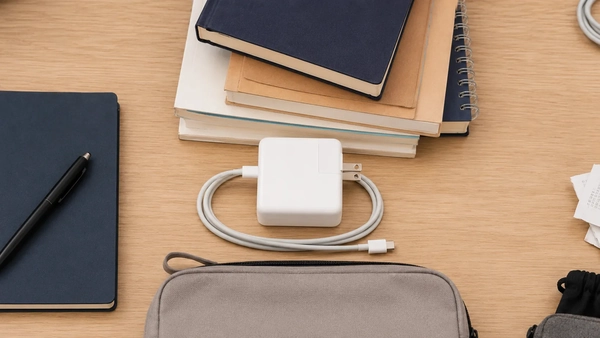
Before adding charging gear, ask:
- Will the device last through the scheduled day?
- Will an outlet be available between classes?
- Does the cable match the device being carried?
- Is another cable already serving the same purpose?
- Will the charger be used, or has it remained untouched for several days?
For deeper guidance on chargers, power banks, cables, device compatibility, and portable technology, use the portable charging and smart tech guide.
Dorm Residents and Commuter Students Should Pack Differently
Living arrangements and commute length have a major effect on backpack contents. A student who can return to a dorm between classes has access to storage that a commuter may not have.

Dorm Resident
A dorm resident can often maintain a lighter daily load. Supplies for later in the week, duplicate chargers, larger personal-care products, food, activity gear, and extra clothing may remain in the room until needed.
The dorm can act as a nearby storage point. A student with a morning class and an afternoon lab may be able to exchange materials between sessions instead of carrying both setups all day. This works only when the schedule provides enough time to return.
A daily backpack should remain separate from the full move-in inventory. Bedding, laundry supplies, cleaning products, storage items, and room equipment belong in the living space rather than the campus carry setup. The Back-to-School Dorm Essentials Checklist covers those room-level decisions in more detail.
Commuter Student
A commuter may spend a longer uninterrupted period away from home. This can make a meal, charging option, weather layer, or compact personal module more useful. The correct setup depends on commute length, transportation method, campus facilities, and the time between classes.
Before carrying additional equipment, check what is available on campus. Access to charging outlets, food, water refill stations, lockers, lounges, printers, or storage may remove the need for several items.
A commuter backpack should prepare for the expected day without turning into a mobile dorm room. Full-size toiletries, multiple changes of clothing, bulk stationery, and duplicate technology should still be questioned.
Student With Work, Gym, Lab, or Club Activities
Students moving from class to another commitment can divide the backpack into modules. Keep class materials together, place activity gear in a separate section, and use available lockers, vehicles, or workplace storage where appropriate.
Separating modules makes it easier to remove an entire group when the activity is not scheduled. It also prevents one commitment from determining the backpack load every day of the week.
Three Example College Backpack Setups
Scenario 1: Dorm Resident With Three Classes
The student has two morning classes, a lunch break near the dorm, and one afternoon class.
Carry: student ID, keys, phone, payment method, one notebook, the laptop required for the afternoon class, a pen, and a water bottle.
Leave: textbooks for later in the week, a full charging collection, large toiletries, gym gear for another day, and extra notebooks.
Why: the student can return to the dorm during the lunch break. There is no reason to carry every afternoon item during the morning or keep dorm supplies in the backpack.
Scenario 2: Commuter Spending Eight Hours on Campus
The student travels by public transportation, attends several classes, and plans to study between sessions.
Carry: the base kit, materials required for each class, one planned charging setup, water, food or a snack, a compact weather item when necessary, and a small personal module.
Leave: devices that are not required, duplicate charging accessories, a full stationery collection, and items already available in a campus lounge or study space.
Why: the day is long and returning home is not practical, but access to campus facilities may still reduce what needs to be carried.
Scenario 3: Classes, Gym, and Work Shift
The student attends class, goes to the gym, and then works an evening shift.
Carry: one class module, one small activity module, the base kit, and only the personal items needed to transition between commitments.
Leave: equipment available at the gym or workplace, large containers, duplicate personal products, and supplies unrelated to that day’s courses.
Skip: backup clothing and gadgets that are repeatedly carried but never used.
Why: separating the day into modules prevents class materials, gym items, and work supplies from becoming one disorganized load. When a locker, car, or workplace storage area is available, the student can avoid carrying every module through every part of the day.
When an Item Tracker May Be Useful
An item tracker may be useful for a student who frequently moves between classrooms, libraries, study areas, dorms, and public transportation and has a history of leaving a backpack or keys behind. It may also provide a way to check the last known location of a compatible item.
The tracker must work with the student’s phone or device ecosystem and should be attached or stored in a way that matches the item being monitored. It is an optional organizational tool, not a required college accessory.
An item tracker does not prevent theft and should not replace keeping your backpack and electronics with you in public campus spaces.
Students comparing device networks, battery formats, card-style trackers, tags, and app compatibility can use the smart tracker types and compatibility guide for a more detailed evaluation.
Organize the Backpack by Access and Risk
A useful backpack layout is based on how frequently an item is used and what could happen if it shifts, leaks, or becomes difficult to reach.
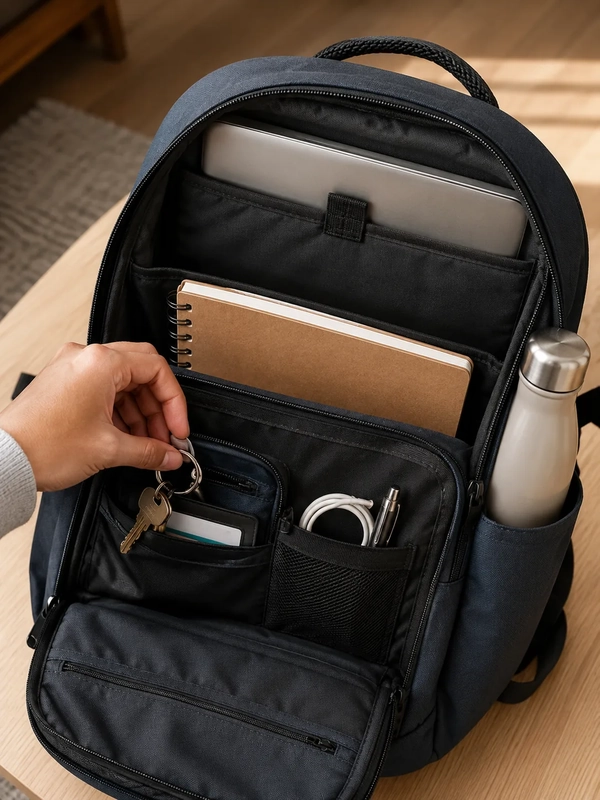
Quick-access area
Use a consistent pocket for a student ID, keys, and another frequently accessed item. The pocket should be secure but reachable without removing all class materials.
Protected device area
Keep a laptop or tablet in the compartment designed for its dimensions. Do not place loose metal items, open pens, or leaking containers beside the device.
Leak-separated area
Water, food, and liquids should be separated from electronics and paper materials. Use the bottle pocket or another section that reduces contact with devices and coursework.
Small-item area
Cables, pens, compact personal items, and other small objects can share one defined area. Multiple pouches are not automatically better; they may create more containers to search through and encourage additional packing.
The number of compartments matters less than whether the layout matches the student’s routine. A large backpack with many sections may still be inconvenient when commonly used items are difficult to reach or when its capacity encourages unnecessary additions.
What College Students Commonly Overpack
Overpacking often develops gradually. Items enter the backpack for one reason and remain after that reason has disappeared.
Materials for other days
Carrying every textbook, binder, and notebook for the week adds clutter without supporting the current class schedule. Pack from tomorrow’s calendar rather than from the full course list.
Duplicate charging equipment
Multiple chargers, cables, adapters, and power banks may serve overlapping purposes. Carry only the setup required by the devices and length of the day.
Too much stationery
Several notebooks, large pen collections, full packs of sticky notes, and multiple organizers usually belong at a study desk. The backpack needs only the tools expected to be used.
Full-size personal-care products
Large containers take up space and may create spill risks. When a personal item is needed during the day, a compact version or a small module is usually easier to manage.
Backup items without a defined problem
A backup is useful when it addresses a realistic failure. Carrying several gadgets or accessories “just in case” creates weight without a clear benefit.
Old receipts, papers, and packaging
Small pieces of clutter make useful items harder to find. Remove them during the daily reset instead of allowing them to accumulate.
Products purchased only because they were discounted
A sale does not create a need. Before buying a new pouch, cable, device, or organizer, identify which daily problem it will solve and whether something already owned provides the same function.
Use a Five-Minute Backpack Reset Each Evening
A short reset keeps the daily load aligned with the next schedule. It also prevents the backpack from becoming increasingly disorganized during the semester.
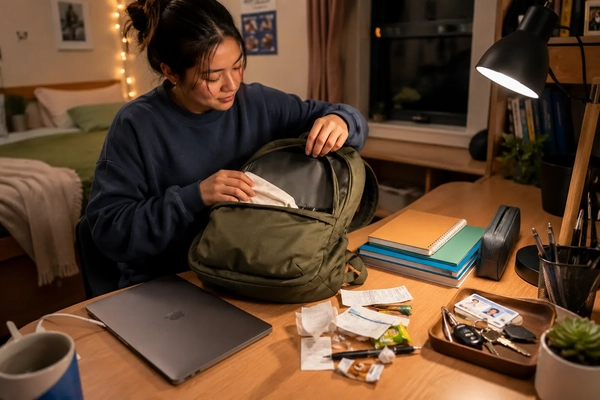
- Remove obvious trash. Take out receipts, food packaging, empty containers, and outdated notices.
- Remove materials not needed tomorrow. Return books, notebooks, and assignments to their normal storage location.
- Return dorm-only or home-only items. Do not let temporary items become permanent backpack contents.
- Recharge required devices. Charging devices outside the backpack may eliminate the need to carry extra charging equipment.
- Add tomorrow’s modules. Review classes, commute, weather, meals, and activities.
- Confirm access essentials. Check that the student ID, keys, phone, and payment method are ready.
Tomorrow’s College Backpack Checklist
Classes
- Required laptop or tablet
- Required notebook or binder
- Book, reading, worksheet, or assignment
- Necessary writing tools
Daily access
- Student ID
- Keys
- Phone
- Payment method
Conditional modules
- Charger or power bank
- Water, meal, or snack
- Weather layer
- Lab, gym, club, or work gear
- Compact personal items
Remove before leaving
- Materials for other days
- Duplicate cables
- Old receipts and packaging
- Empty containers
- Items carried repeatedly but not used
What to Check Before Buying a Backpack or Campus Accessory
Complete the Daily Load Audit before purchasing anything. The goal is to identify a real need first and then evaluate whether a product solves it.
Before buying a backpack
- Device fit: Confirm that the laptop or tablet compartment matches the dimensions of the device.
- Daily capacity: Select capacity according to the normal class load, not the largest possible packing scenario.
- Compartment layout: Check whether frequently used items, devices, water, and small accessories have practical locations.
- Empty bag weight: Consider how much weight the backpack adds before anything is placed inside it.
- Access: Review whether the ID, keys, phone, and other recurring items can be reached without unpacking the main section.
- Use across routines: Decide whether the design fits classes, commuting, work, or activities that occur regularly.
- Return conditions: Check the merchant’s applicable return terms before ordering.
Before buying an accessory
- Confirm compatibility with the device or backpack.
- Identify the daily problem the accessory is expected to solve.
- Review the product dimensions and included components.
- Check whether an existing item already performs the same function.
- Avoid bundles containing several products that will not be used.
- Do not assume a discounted accessory belongs in the daily setup.
Before using a coupon or deal
After identifying the right product, review the offer rather than relying only on the headline. Check:
- Which model, size, color, bundle, or collection is eligible.
- Whether sale or clearance products are excluded.
- Any minimum-purchase requirement.
- Shipping conditions and regional availability.
- Whether the coupon can be combined with an existing markdown.
- Subscription, first-order, or new-customer restrictions when applicable.
- The offer’s expiration details and other listed exclusions.
For more seasonal planning resources and current student offers, review Back-to-School deals and student savings on Coupinify.
Frequently Asked Questions
What should I bring to college classes every day?
Start with a student ID, keys, phone, payment method, required class materials, and one way to take notes. Add a laptop, charger, food, weather layer, activity gear, or other module only when the day’s classes, commute, or activities require it.
Do college students need to carry a laptop every day?
No. The decision depends on course requirements, assignments, the student’s note-taking method, and access to campus computers or other devices. Carrying a laptop on days when it will not be used also creates additional needs such as a case, charger, cable, or adapter.
What should commuter students keep in their backpacks?
A commuter may need the base kit, materials for multiple classes, a planned charging setup, water or food, a weather item, and compact personal essentials. The exact contents depend on commute length and access to campus resources such as outlets, food, lockers, lounges, and water refill points.
What should I avoid carrying in a college backpack?
Avoid materials for classes on other days, duplicate chargers, unnecessary adapters, bulk stationery, full-size personal-care products, old receipts, empty packaging, and backup gadgets without a defined use. Any item repeatedly carried but not used should be reviewed during the daily reset.
How often should I clean out my college backpack?
A quick reset can be completed each evening by removing trash, returning unused materials, charging devices, and packing for the next schedule. A more complete cleanout can be done weekly or whenever papers, food containers, unused accessories, or other clutter begin accumulating.
Is an item tracker necessary for a college backpack?
No. A tracker is optional and may be useful for someone who frequently misplaces a backpack or moves through many campus and transit locations. It must be compatible with the student’s devices, and it does not prevent theft or replace keeping valuables attended.
Pack for the Schedule, Not the Entire Semester
A useful college backpack is not the one that holds the most items. It is the one that supports the current schedule without making important materials difficult to find.
Begin with a small base kit, add only the modules required by the day, and place every item into a clear Carry, Leave, or Skip decision. Dorm residents, commuters, and students combining classes with work or activities will arrive at different setups, even when they attend the same school.
A five-minute reset each evening keeps that setup accurate. Remove what belongs elsewhere, recharge what will be used, and prepare only the materials required tomorrow. This routine creates a lighter, more organized backpack without relying on an oversized list of products that every student is expected to buy.